Tax robot for Simples Nacional companies
Invoices go out on their own. The monthly tax arrives ready.
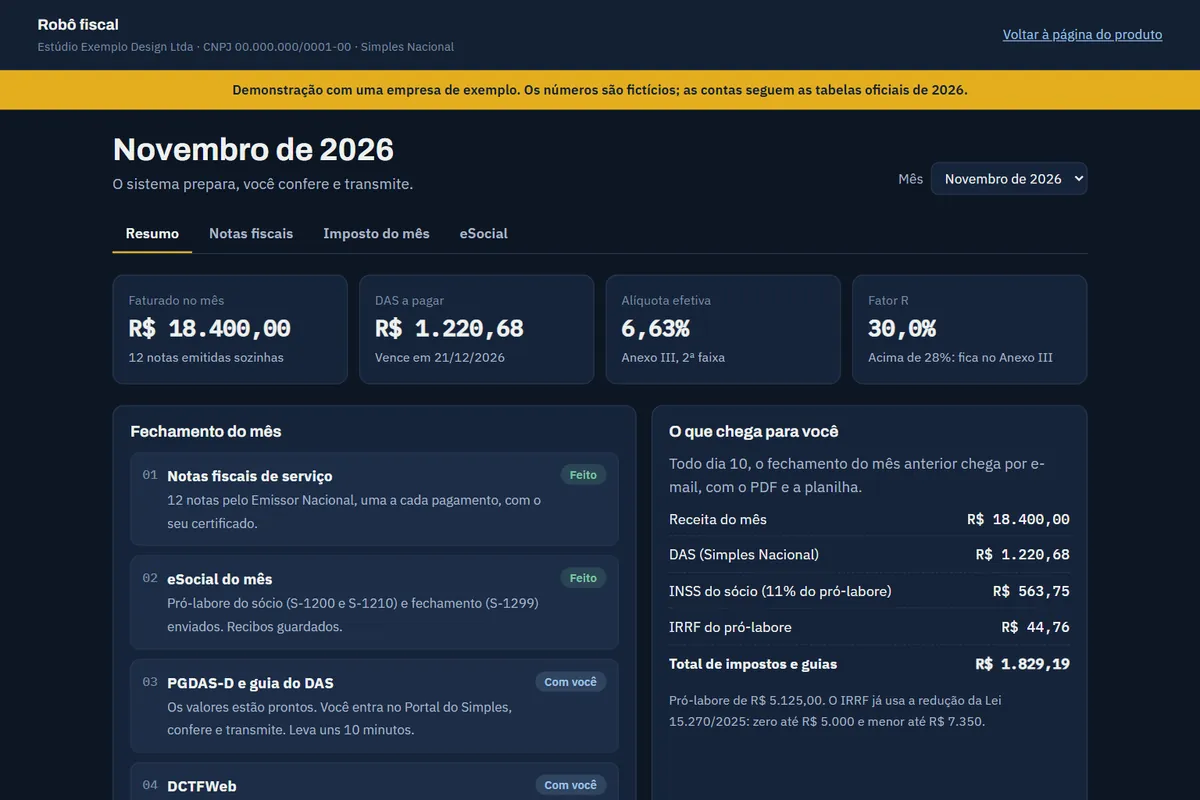
For service companies under Brazil’s Simples Nacional: the system issues the service invoice for every payment, works out the DAS tax and the Fator R, files eSocial and sends the month’s summary. You check and submit the return.
One-time setup of R$ 1,290, in up to 12 card installments, plus R$ 199 a month for hosting, updates and support.
How it works
From agreement to delivery.
- 01
Setup with your certificate
We register the company, its services and the invoice codes. You send the A1 certificate encrypted through the start form. First we check that your city issues invoices through the national system.
- 02
An invoice for every payment
A confirmed payment in Asaas becomes a service invoice within 10 minutes, through the national system, with your certificate. Your customer gets the invoice and the PDF by email.
- 03
DAS, Fator R and eSocial
Every month the system adds up revenue, finds the right bracket, works out the DAS and the Fator R and files the owner’s pay and the month closing to eSocial, with a receipt.
- 04
Monthly summary on the 10th
On the 10th the previous month’s summary arrives by email, with the PGDAS-D figures and a step-by-step guide. You check, submit and pay. It takes about 15 minutes.
Price and what is included
What is in and what is out.
In up to 12 interest-free card installments. The monthly fee starts in the second month.
Included
- Setup with the company’s A1 certificate and your list of services
- Automatic service invoice for every Asaas payment
- DAS, Fator R and suggested owner’s pay worked out
- eSocial filings for the owner’s pay and the month closing, with receipts
- Monthly summary by email, with PDF, spreadsheet and the PGDAS-D guide
- Hosting, updated tax tables and support in the monthly fee
Not included
- Submitting the PGDAS-D and DCTFWeb: you submit them
- Bookkeeping, balance sheet and accountant advice (partner accountant, hired separately)
- Payroll for registered employees and product invoices (NF-e)
- MEI and companies outside Simples Nacional
We need from you
The company’s CNPJ, its list of services and its A1 certificate with its password, sent encrypted through the start form. Every month, someone at the company checks the summary and submits the PGDAS-D and DCTFWeb.
Straight answers
What owners ask.
Does it replace my accountant?
No. It is a tool that does the repetitive part: invoices, calculations and filings. Bookkeeping, balance sheets and advice are an accountant’s job. If you have no accountant, we can refer a partner accountant, hired separately.
Who submits the Simples return?
You do. The system leaves the figures ready with a step-by-step guide, but the company submits the PGDAS-D and DCTFWeb on the government portals. The gov.br login does not accept robots, and the company is responsible for the return.
What happens to my digital certificate?
You send the A1 certificate through the start form, and it is encrypted in your own browser before it leaves. The portal stores only the encrypted file, which it cannot open, and only the machine that runs the robot has the key. It never goes into email, spreadsheets or open cloud storage. You can ask for it to be deleted at any time, and it is deleted within 30 days after the subscription ends.
Does it work in my city?
It works where the city issues invoices through the national NFS-e system. We check your city from the start form. If your city does not use the national system, we refund the setup fee.
I get paid outside Asaas. Does it work?
Automatic invoices currently read Asaas payments. If you get paid another way, we check before you buy whether the system can connect to it. The DAS, Fator R and eSocial parts work the same.
Start with the free checkup.
Six questions and three minutes, with your Google account. You get a written list of the tasks that can be automated and decide what comes next.